Bounce Rate
What bounce rate measures, how GA4 defines it, what counts as high, and five fixes that bring it down without costing you the visitors you want.
Your site can pull in plenty of visitors every day and still earn nothing from them. Bounce rate is the number that shows how often that happens: the share of visits where someone arrives on a page and leaves again without doing anything at all, no click onwards, no product in the basket, no form filled in.
A high figure is rarely good news. It also has entirely innocent explanations, and telling the two apart is what makes the metric useful. Read on its own it invites bad decisions. Read next to the rest of the picture, it is one of the fastest ways to find pages that are attracting the wrong visitors or losing the right ones.
What bounce rate measures
The calculation is simple:
Single-page visits with no further action / total visits = bounce rate
You will find it per channel and per page in your analytics setup, which is where it becomes actionable. A site-wide average tells you almost nothing. The same number split by landing page tells you exactly which templates are underperforming.
How GA4 changed the definition
This matters more than most teams realize, because the metric is not the one they grew up with. GA4 works from engaged sessions, and it counts a session as engaged if it lasts longer than ten seconds, includes at least two page views, or triggers a key event. Bounce rate in GA4 is simply the inverse: the percentage of sessions that failed all three tests.
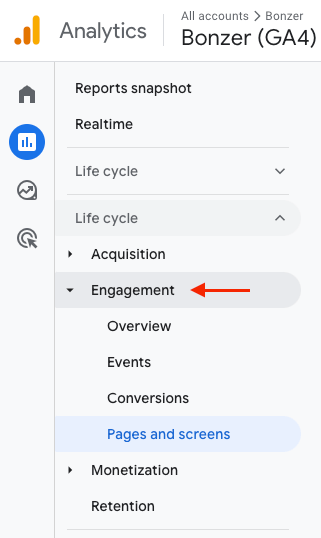
The practical consequence is that GA4 bounce rate and the old Universal Analytics bounce rate are not comparable, and a visitor who reads a page carefully for thirty seconds and then leaves is no longer counted as a bounce. Anyone still comparing this year's figure to a pre-2023 benchmark is comparing two different measurements. You find it under Engagement, and how it fits into the rest of your reporting is covered in search analytics and reporting.
What counts as high
It depends on the industry and, more importantly, on the type of page. A blog post answering one specific question completely will show a higher figure than a category page, and that is the correct outcome rather than a problem to fix. As a rough guide across a site:
- Up to 40% is strong
- 41 to 55% is normal
- 56 to 70% is below average
- Above 70% needs looking at
Compare a page to pages like it, and to its own history, before you compare it to a benchmark.
Is it a ranking factor?
Google has said clearly that bounce rate is not a metric you should tie to rankings, and that answer has held up. It is measured in your analytics, not theirs, and it would be trivially easy to manipulate.
That does not make it irrelevant. What bounce rate tells you is whether the page satisfied the person who landed on it, and satisfaction is precisely what search engines are trying to approximate with the signals they do use. Read together with dwell time and the ranking factors that are documented, a high bounce rate is a reliable pointer to where the real problem is.
Five ways to bring a high bounce rate down
1. Make the page answer the query it ranks for
The most common cause is the simplest one. Someone searched, your page appeared, and the page turned out to be about something adjacent. A search for a recipe wants a recipe, not an essay on the history of the dish. Go through the queries a page actually ranks for in Search Console, compare them to what the page delivers, and either rewrite it to match or move the query to a page that fits. Keeping that alignment across the site is the job of keyword research.
2. Fix what makes the page slow
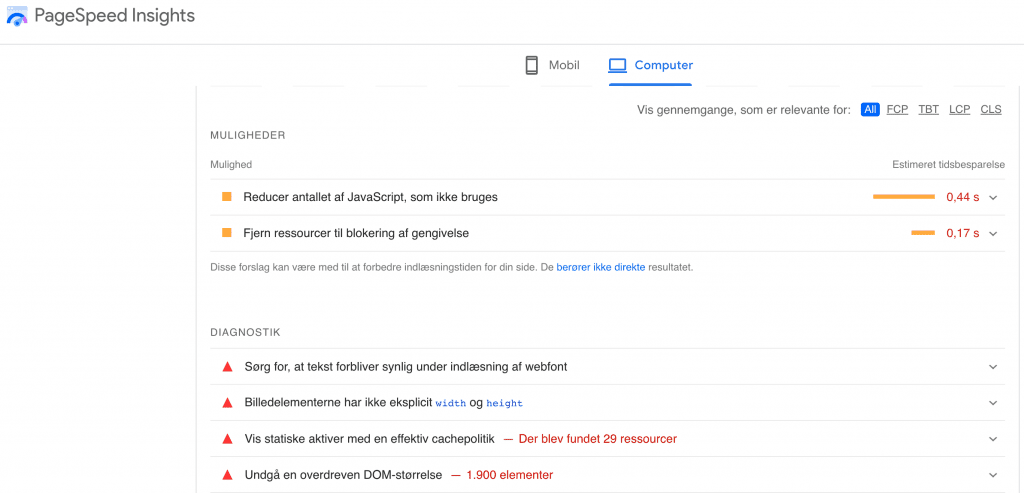
Every extra second of load time costs you visitors who never see the content. Images are usually the culprit, followed by third-party scripts. PageSpeed Insights will point at the specific elements, and the metrics that matter, along with how to read them without chasing a perfect score, are covered in Core Web Vitals.
3. Treat mobile as the default
Most visits arrive on a phone, on a weaker connection and a slower processor, and Google evaluates the mobile version of your pages. If a mobile visitor has to pinch to read, hunt for a tap target or dismiss two overlays before the content appears, they leave. Test the templates that carry your traffic on an actual device, not just in a desktop browser at a narrow width.
4. Give long pages somewhere to breathe
Long-form content earns rankings and loses readers in the middle. Break the text with subheadings that describe what comes next, pull the key point of a section into bold, and put a table, a chart or an image where the argument needs one. Every one of those elements gives a skimming reader a reason to keep going instead of reaching for the back button.
5. Use video, and host it properly
Video holds attention better than almost anything else you can put on a page. Embed it from your own video channel rather than uploading the file to your site, so the player loads lazily and does not drag your load time down with it. What each format is good for is covered in visual and multimodal content.
None of the five is exotic, and together they usually account for most of the gap. If you want a read on which of your own pages are losing visitors, and why, a free SEO analysis goes through the traffic and the pages it lands on.

CPO & Partner
Thomas is CPO and Partner at Bonzer, responsible for analyzing search engine algorithms and SEO product development.