Core Web Vitals & Technical UX
Core Web Vitals measure the real user experience on your site. Get to grips with LCP, INP and CLS, and see how to find and fix the problems in practice.
Market leaders in SEO are not only the ones best at producing high quality content or at earning links. They are also the ones best at using the data search engines hand them about the technical health of a site. Core Web Vitals is the clearest example: three measurements that turn "the site feels slow" into something you can locate, prioritize and fix.
The three metrics
Core Web Vitals report on how your pages actually behave for real users, measured in Chrome on real visits. Each metric covers one part of the experience:
- Largest Contentful Paint (LCP)
- Interaction to Next Paint (INP)
- Cumulative Layout Shift (CLS)
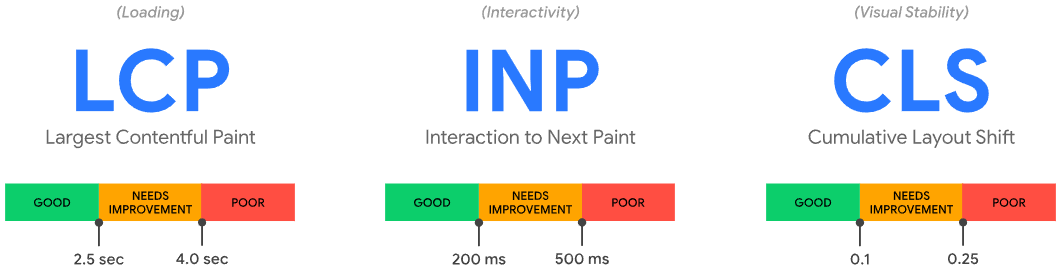
On their own the three numbers say little. Together they describe what a visitor meets: how long until the page shows something useful, how quickly it responds when they act, and whether it holds still while they read.
Largest Contentful Paint (LCP)
LCP measures how long it takes for the largest image or text block in the viewport to render, counted from when the page started loading. The focus used to be on First Contentful Paint, but Largest turned out to match the user's sense of "the page is here" much better. LCP is measured in seconds and counts as good below 2.5 seconds.
Interaction to Next Paint (INP)
INP measures how quickly the page responds to interactions such as a click, a tap or a keystroke. It should stay below 200 milliseconds. INP replaced First Input Delay in 2024, and the change matters: FID only measured the delay before the first interaction was processed, so a page could score well while every later click stayed sluggish. INP looks at the responsiveness across the whole visit, which is a much harder and much more honest test.
Cumulative Layout Shift (CLS)
CLS estimates visual instability after the initial render. It covers unexpected layout shifts, so you are not penalized for design choices the user triggered themselves. Because it is an abstract measure, it is not scored in seconds but as a layout shift score, combining how much of the viewport moved with how far it moved. Below 0.1 is good.
Alongside the three, keep an eye on Time to First Byte (TTFB). It is not a Core Web Vital in its own right, but it sets the ceiling for LCP. If the server takes a second to answer, no amount of image optimization will bring LCP under 2.5 seconds.
How we use Core Web Vitals in technical SEO
Our method is the same on every site: investigate, analyze, execute. Brödernas, one of Sweden's favorite places for premium burgers and beer, is a good example, because their site had issues across all three metrics.
Investigate. The Core Web Vitals report in Google Search Console groups URLs by problem, which is what makes it more useful than a single page speed score. Going through the flagged URL groups made it clear that CLS was the dominant issue.
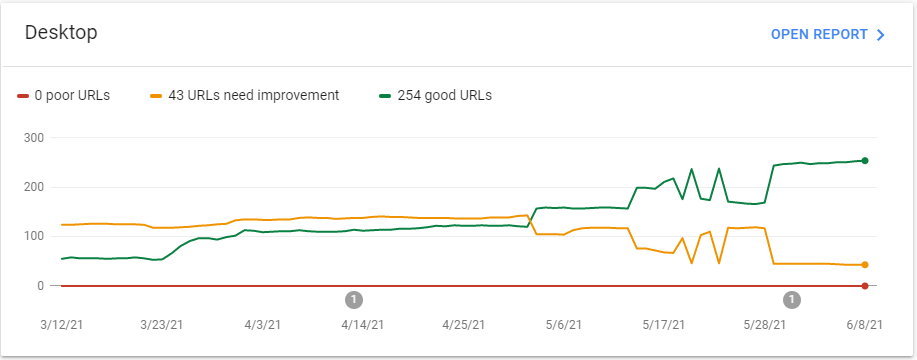
Analyze. We then took the URLs reporting high CLS and worked out which elements moved, and by how much. PageSpeed Insights confirmed the diagnosis on the individual URL and pointed to the specific elements under "Avoid large layout shifts".
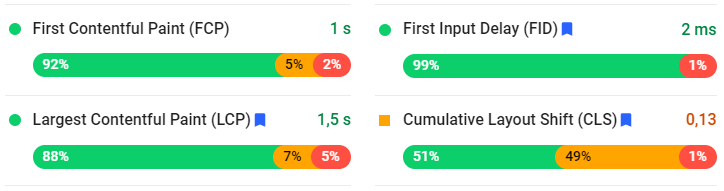
Execute. Most of the CLS came from images served in outdated formats. They were heavy, they loaded late, and they pushed the layout around when they finally arrived. Converting the formats, setting explicit dimensions and reserving space brought CLS back in line across the affected templates.
That sequence is the point. PageSpeed Insights gives you a lab snapshot of one URL. Search Console tells you which page groups real users struggle with. Used together, they produce a prioritized list instead of a wall of recommendations.
Where the wins usually are
The same fixes come up again and again, and none of them are exotic:
- Images. Modern formats, correct dimensions, lazy loading below the fold, and never lazy loading the LCP element itself. This is the single biggest lever on most sites.
- Server and delivery. Caching, compression and a CDN close to your users cut TTFB, and LCP follows.
- JavaScript. Long tasks on the main thread are what make INP bad. Break them up, defer what is not needed for the first view, and audit third-party scripts. Consent tools, chat widgets and tag managers are frequent offenders. How your site renders in the first place matters just as much, which is why JS SEO and rendering belongs next to this work.
- Reserved space. Fixed dimensions on images, ads and embeds, and no content injected above what the user is already reading.
- Fonts. Preload the fonts used above the fold and serve a fallback, so text is readable while the webfont loads.
Mobile is where this gets decided. Most sites see the majority of their visits on phones, on slower connections and weaker processors, and Google evaluates the mobile experience. A desktop score of 95 tells you very little if the mobile score is 40.
Reading the report without chasing a perfect score
Two data types show up in the tools, and mixing them up leads to wasted work. Field data comes from real Chrome users over the past 28 days, and that is what Search Console reports and what search engines act on. Lab data comes from a simulated load in Lighthouse or PageSpeed Insights, and it is useful for debugging a single page, not for judging the site.
That difference also explains the delay after a fix. Field data updates as the 28-day window moves, so a change deployed today shows up in the report over the following weeks.
And keep the ambition proportionate. Core Web Vitals is one signal among many, and a page with weak content does not outrank a strong one by being fast. The reason to do the work anyway is that speed and stability pay twice: better visibility, and measurably better conversion on the traffic you already have. Slow pages lose customers long before they lose rankings.
Want to know where your own site stands, and which of the fixes above would actually move the needle? A technical SEO audit goes through the site systematically, and a free SEO analysis puts the technical picture next to your content and visibility.

CPO & Partner
Thomas is CPO and Partner at Bonzer, responsible for analyzing search engine algorithms and SEO product development.