Alt Tags
Alt text describes your images for screen readers, image search and AI models. Get the rules for writing alt tags, and for keeping them under control at scale.
An alt tag is the short line of text that describes what an image shows. It almost never appears on the page, and it gets read by three audiences that otherwise have nothing in common: screen readers, the image indexes behind search engines, and the AI models that now interpret pictures alongside the words around them. Images without alt text are one of the cheapest gaps you can close in SEO.
What is an alt tag?
Alt text, also written as alternative text or alt descriptions, is an attribute on the HTML image element. It sits in the markup rather than in the visible layout, and every mainstream CMS gives you a field for it the moment you upload a file:
<img src="silver-bracelet.jpg" alt="Woman wearing a hammered silver bracelet">
That is the whole implementation. The work is in what you put between the quotation marks.
What a good alt tag looks like
Say you sell jewellery online, and one of your category images is this:

A useful alt tag here would be "woman wearing a raw patterned silver bracelet". It names the object, the material and the detail that makes the picture worth showing. Notice that the keyword the page is built around, silver bracelet, ends up in the description without being forced there. That is the order to work in: describe the image honestly, and let the keyword land where it belongs.
Alt text is not the image title
The two get mixed up constantly. Both are short pieces of text attached to a file, but only the alt attribute is read by search engines and assistive technology. The title is for you: it is how you find, sort and reuse the file inside your own media library, and it can be a product number or three words of shorthand without doing any harm.
Why alt tags matter
The visitors who cannot see the image. Not everyone sees equally well, and a good deal of your audience browses with a screen reader. The reader speaks the alt text out loud when it reaches an image, so a well-written description is the difference between a page that makes sense and a page with silent gaps in it. Accessibility is the primary reason the attribute exists, and it happens to be the reason it works for search too.
Image search and AI answers. A search engine cannot look at a photograph the way a person does. It reads the alt text, the file name and the copy immediately around the image, and it uses that to decide what the picture is of and which queries it belongs to. Multimodal models have made real progress at interpreting images directly, and they still treat your alt text as the caption of record. Skip it, and you drop out of image results and out of the visual entry points covered in visual search.
The page that has not finished loading. Alt text renders in place of the image while it is still on the way, and stays there permanently if the file is missing or the path breaks. On a slow connection that text is the only version of the image a visitor gets.
How to add alt text
Almost every content management system asks for it at upload. In WordPress the field sits in the media panel next to the file:
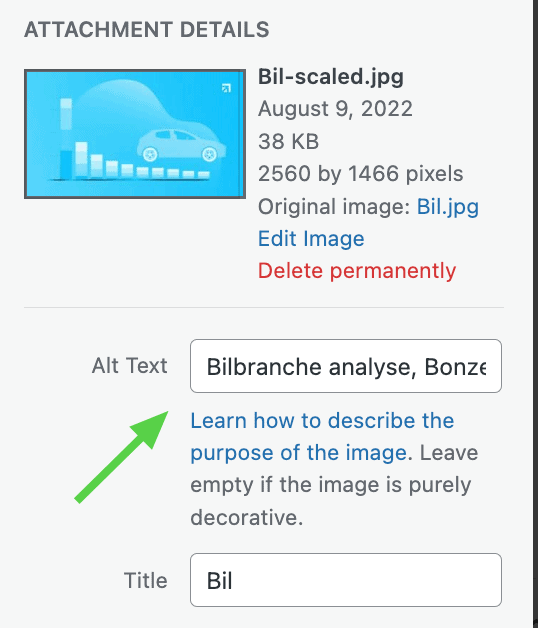
Fill it in while you are uploading. Teams that leave it for later end up with several hundred untagged images and a cleanup project nobody wants to own, and images without alt text quietly drag down the technical health that the rest of technical SEO depends on.
Rules that hold up
- Describe, do not label. "Image", "photo" and "graphic" tell nobody anything. Say what is in the frame, in the way you would describe it to someone on the phone.
- Keep it to roughly 125 characters. Screen readers cut long strings off, and a description that needs more than a sentence is usually describing two things.
- Do not stuff keywords. Google's own image guidelines are explicit about this, and a string of comma-separated search terms reads as spam to the crawler and as nonsense to the listener.
- Leave decorative images empty. A spacer or a background flourish carries no information, and
alt=""tells a screen reader to skip it rather than read out a filename. - Do not repeat the visible caption. If the text under the image already says it, the alt attribute can add the detail the caption left out.
- Translate alt text when you reuse images. The same photo on your Swedish and English pages needs two descriptions. This is one of the small things that separates a properly localized site from a copied one.
Alt tags are also the entry point to a broader discipline. Once the descriptions are in place, file names, formats and compression decide how well the images actually perform, which is the ground covered in visual and multimodal content.
Want to know how many of your own images are missing a description, and what that is costing you in image and AI visibility? A free SEO analysis covers it alongside the rest of your technical foundation.