Visual Search
Visual search starts with the camera instead of the search box. How to optimize your images for Google Lens, Pinterest and multimodal AI search.
Visual content is one of the most direct ways to strengthen your organic presence, and one of the most consistently neglected. Two disciplines sit behind it, and they are worth keeping apart. Image SEO is where somebody searches with text and gets pictures back. Visual search optimization is where the search starts with a picture. Two sides of the same coin, and the useful part is that most of the groundwork serves both.
Can you search with a picture?
Visual search is an AI-assisted search through the camera rather than through the keyboard.
Say you are after a new pair of sneakers. You could go to Google and type "sneakers", then narrow it down if you happen to know the brand. Or you could open Google Lens, point the camera at a pair you like, and search with that. Machine learning reads the frame accurately enough to identify the object and treats it as the query. For anyone selling something with a visual identity, being at the end of a journey that started that way is one of the cleanest ways to pick up market share.
Image SEO is the other half
Image SEO follows many of the same principles with older technology behind it. Where visual search means searching with an image, image search is a text query with visual results, as in Google Images:
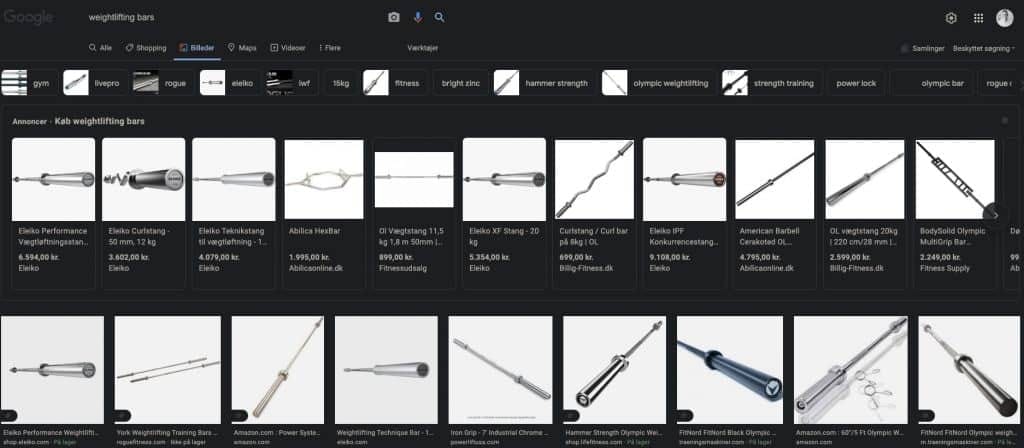
The practical case for doing the work is mundane. People find products through image results constantly, and then fail to save the link. If your images are hard to find, the second attempt lands on a competitor.
The two platforms to know
Google Lens is the visual search engine attached to the world's largest search company, with the motto "search what you see". Beyond recognizing objects it reads and translates text inside images, and it resolves what it finds against Google's Knowledge Graph, which is what makes the results specific rather than approximate. It is built into Android, into the Google app on iOS, and into the AI answer surfaces, so the camera is now a search box for a very large number of people who never thought of it that way.

Pinterest Lens matters most for e-commerce. It lets someone gather inspiration and buy the product in the same movement, which is a short path from image to transaction. There is a synergy worth chasing between the two, partly because the optimization overlaps and partly because Pinterest pages are among the most commonly returned results in Google Lens searches:
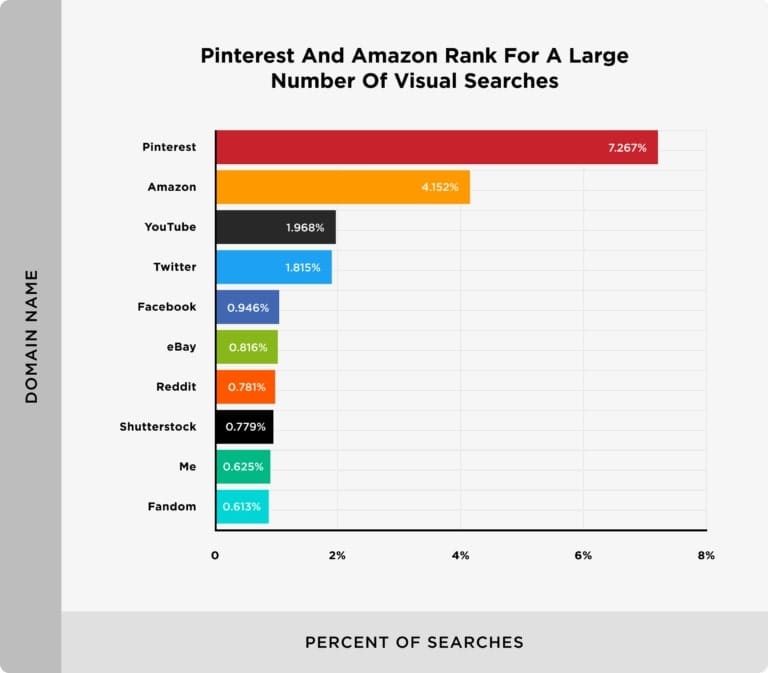
Optimizing for both is realistic even on a modest budget. Good image practice counts across both, and each platform then needs a few direct steps of its own.
Best practices for image SEO
The advice splits into two jobs: improving how well search engines understand your images, and making it easier for them to find, index and serve them.
Alt text and accessibility
Alt text describes the image in the markup. Screen readers speak it, slow connections show it, and search engines use it to decide what the picture is of. Include the term you are optimizing for where it fits naturally, describe the image well enough that somebody could picture it unseen, and stop there. "Black labrador playing with a chew toy" beats "dog playing". The full rules are in alt tags.
Precise, descriptive file names
The file name carries more weight than most people expect. In Backlinko's study of Google Lens results, 22.6% of the images returned had a file name matching the search. So rename files before upload, use hyphens rather than spaces, treat the name as a good place for a longer-tail variant, and translate it when you reuse an image across markets.
Give the page some context
Search engines also read the content around the image and the conventional signals of the page it sits on. So the page title and URL should be optimized for the same term, the image should sit near text that describes it, and the pictures you most want to rank belong near the top of the page rather than buried at the bottom.
Formats and compression
Image files are usually the heaviest thing on the page, which makes them the first place to look for speed. Google can serve BMP, GIF, JPEG, PNG, WebP, AVIF and SVG in image results. In practice: PNG when you need transparency or the image is flat colour, such as a diagram. JPEG for photographs. WebP or AVIF wherever you can, since both are substantially smaller than the equivalent PNG or JPEG at the same quality and both are supported across current browsers. For logos and simple explanatory graphics, SVG is light and scales perfectly.
Then compress before you upload. It is a balance rather than a target: too little and the page drags, too much and the quality damage undoes the point. What the load time costs you is covered in Core Web Vitals.
Get the dimensions right
A common problem is uploading images far larger than the space they appear in. File size grows with the dimensions, and images get cropped or scaled oddly once they land in a container. As a rule the file should roughly match the slot it is used in, slightly larger to account for high-density screens, unless you are serving responsive variants. Chrome DevTools tells you the real dimensions of the element in seconds. In this example from a news site, it is 480 x 276:
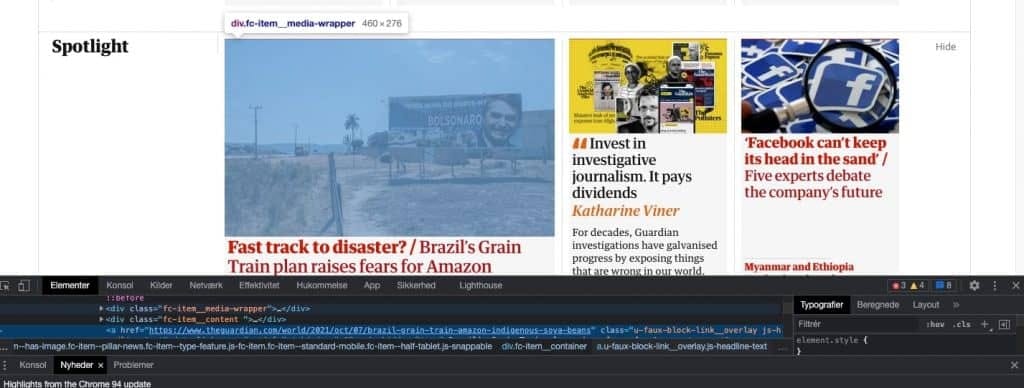
Image sitemaps and structured data
An image sitemap helps search engines discover and use your images, and unlike an HTML sitemap it can point at URLs outside your own domain, which lets you serve images from a CDN and still have them associated with your pages. Generate it with a tool rather than by hand, and see crawling and indexing for how sitemaps fit the wider picture.
Product, video and recipe markup then make it considerably easier for a machine to judge whether an image is relevant to a visual query. Use JSON-LD, generate it at scale, and validate it. The formats and the common errors are in structured data.
A few steps per platform
For Google Lens, if you are already doing SEO you are most of the way there, since it runs on the same asset: your own site. Three things add to it. Use original, high-quality images rather than the supplier photos every competitor also has, keep a current Google Business Profile, and if you sell products, feed the catalogue into Merchant Center so Google knows your range, prices and stock.
For Pinterest, be honest about the effort. It behaves like its own channel rather than an extension of your site, and it rewards engagement the way social platforms do. The minimum for presence: a business account, boards organized with the same categories you use on your own site, a claimed and verified domain, and a product feed uploaded so people can buy inside the app.
Where this is going: multimodal search
The neat distinction this guide opened with, text searches returning images and image searches returning text, is dissolving. Search is multimodal now. You can photograph an object and ask a question about it in the same query, and the answer comes back as generated text with sources attached. Google Lens feeding into AI Mode, Gemini reading an uploaded photo, ChatGPT answering questions about a screenshot: the same shift, drawing on the same underlying understanding of what your images show and which page they belong to.
Which is why the work compounds. Every image with an honest description, a sensible file name and relevant text around it is easier for a model to interpret and cite. The broader case for treating images and video as entry points in their own right is made in visual and multimodal content.
Want to know how findable your own images are today, in image results and in AI answers? A free SEO analysis covers it.

CPO & Partner
Thomas is CPO and Partner at Bonzer, responsible for analyzing search engine algorithms and SEO product development.